Friday, December 10, 2010

Today, Club Penguin had released another EPF Field Ops assignment. Field Ops are small missions that allows EPF agents to help keep Club Penguin safe by doing these missions. When you complete a mission, in return you will receive an amazing EPF badge! Let’s get started on this week mission!

Use your Spy Gadget and teleport to the EPF Headquarters. Waddle towards the ‘Field Ops’ screen on the top right side.

To start this week’s mission, use your map and head to the Plaza. Walk to the top of the screen towards the Stage and walk near the ticket booth.


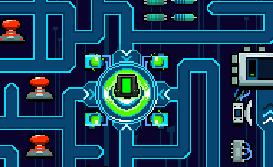
Open your Spy Gadget in the bottom left corner and click Engage. To finish the Field Ops, you have to power up the chipset. Go back to your starting position to recharge your battery. Avoid red traps on your way to the power ups and your starting position.

Well done on completing the mission if you diden't keep trying, now that you completed it you could buy somthing cool in the elite gear.

I you have completed 25 field-ops missions, you can earn the Elite Protecter Stamp!

Club penguin treaure book #11 cheats

Club Penguin has released Series 11 Treasure Book! This means that if you get a Club Penguin plush, Mix and Match Figure, or any other toy that is Series 11, you can unlock exclusives from the book! Here are the cheats:

On the 1st page there is a King Outfit:

On the 2nd Page there is there is a Water 3000 Suit and a Green Hard Hat, and if you click on the Lighthouse you will find the Green Recycling T-Shirt:

On the 3rd page there is a Fish, Yeti, and Squidzoid Costume:

On the 4th page there is Blue Hockey Gear and Figure Skating Gear (For Girls)

On the 5th page there is there is Black Glasses, a Pet Shop Apron, a I love my Puffle Shirt, The Surf Knot Wig, and Orange Sneakers:

Last but not least, The Exclusives! There is a Pink and Yellow Chullo, Yellow Designer Scarf, Green Mittens, Purple Whirl Snowsuit, and Pink Fuzzy Boots!

The other penguin is wearing a Green Pom Pom Tonque, Green and Blue Scarf, Grey Mittens, Blue Winter Jacket, and Blue Winter Boots

I hope you enjoy these items!

Friday, December 3, 2010

New Club Penguin snowflake pin!

Login on Club Penguin, click on you’re map and go to the Snow Forts.
Then waddle to the left part of Club Penguin’s Clock.
Click “Yes” and the snowflakes Pin will be added to your inventory.

Penguin Style December 10th

1. Go to page 3
2. Click on the Lights

3. Go to page 3
4. Click on the “F” in the Coffee Shop Name

5. Go to page 4
6. Click on the Yellow Puffle

7. Go to page 4
8. Click on the Snow Fort

9. Go to page 5
10. Click on the top of all trees

11. Go to page 6
12. Click on the Evergreen Tree

13. Go to page 7
14. Click on the Ornament

15. Go to page 8
16. Click on the the Evergreen Tree

17. Go to page 9

18. Click on the Penguin Face

19. Go to page 10
10. Click on the Penguin Face

21. Go to page 10
22. Click on the Penguins Hand

23. Go to page 11
24. Click on the Fish (Close and open 3 Times You Can get the Blue Viking Helmet)

25. Go to page 12
26. Click on the Penguins Nose

27. Go to page 12
28. Click on the Penguins Nose

29. Go to page 13
30. Click on the Ghost Face

31. Go to the last page
32. Click on the Evergreen Tree

Thursday, December 2, 2010

Club Penguin Elite Penguin Force Field Op Assignment #25

Click on your Spy Phone then click “Go There” for easy access to the Command Room.

Read your orders from G then go to the Cove!

Stand down in the right corner of the cove (right where the Catalog Icon is) for your Spy Phone to ring.

Click on your Spy Phone then click “Engage”

  • Green = Symbol is correct.
  • Yellow = Symbol is in the wrong spot.
  • Red – Symbol is wrong.

After you’ve clicked engage, for the first column just take a guess at where the symbols are (make sure to click scan when your done). Use the colors around the symbols in the first column to determine what you should try next. Just repeat this until all of them are green!

Monday, November 29, 2010

Club Penguin Elite Penguin Force Field Op Assignment #24

Club Penguin Elite Penguin Force Field-Op #24, full guide below!

EPF Assignment 24

Click on your Spy Phone then click “Go There” for easy access to the Command Room.

Stand by the third square from the door (directly under the HQ 2005 button) in the VR Room!

Click your Spy Phone.

In this Puzzle you will need to power up the Chipset!

Guide the micro chip to each station (they are silver and have arrows pointing to them). Some have a lock in front, if they do just move the micro chip to the key then back to that station. You move the chip by using the arrows on your Key Board!

Move the micro shop to each station then wait for it to charge (will have a green light once charged).

When moving the micro chip through the maze watch out for the red things, they will shock you and if that happens you’ll have to start all over again! Ig they have their arm/grabber thing extended to where your about to move don’t go there because you will get shocked!

If your micro ship is low on battery (you can tell by the green bar in the middle, you can not charge the stations if the chip is low on battery) then go back to the center piece to recharge!